
Claude Code memory
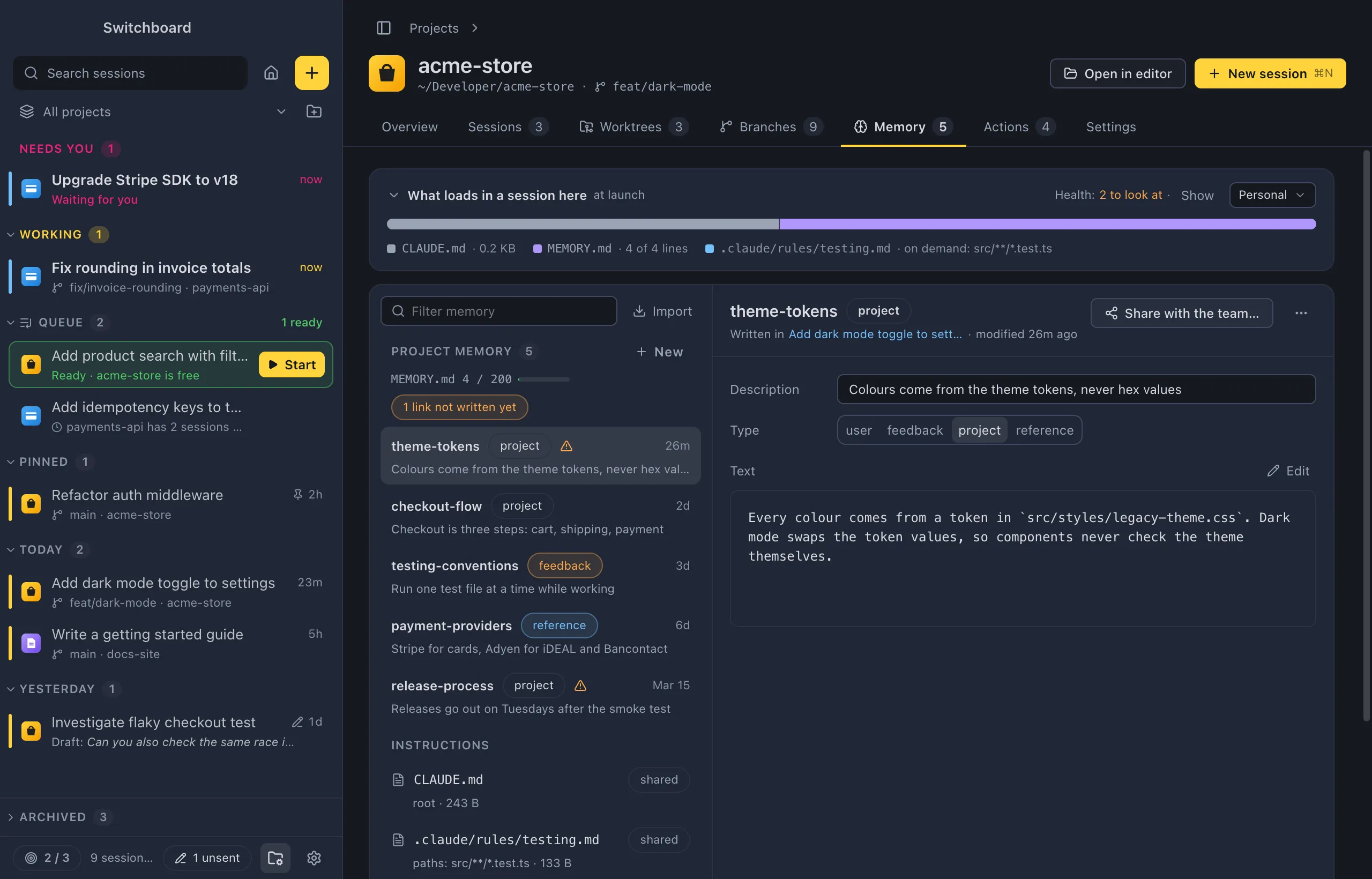
Claude Code keeps what it learns about a project as memory: small Markdown files in a folder of its own, private to you and to this computer. A MEMORY.md index lists them and loads at the start of every session. Switchboard is an editor for those files.
Nothing is locked in
Section titled “Nothing is locked in”Switchboard writes memory where Claude Code already looks, in the format it already uses. Memory works the same in claude in a terminal, the VS Code extension and the desktop app, and keeps working if you uninstall Switchboard. Nothing in Switchboard’s own database is the source of truth.
Switchboard never changes a memory on its own: every change is one you start. It never stages, commits or pushes anything.
Open it
Section titled “Open it”- A project’s Memory tab: see Memory tab.
- Memory… in the command palette (Command, KControl, K): the current project’s Memory tab, or Settings › Memory with no project in view.
- Settings › Memory (Command, CommaControl, Comma, or Memory settings… in the palette): your personal memory and every project’s. See Settings.
- Command, Shift, FControl, Shift, F searches memory next to your conversations, and Search memory… searches memory only. See Links and search.
Where memory lives
Section titled “Where memory lives”| What | Where | Loaded |
|---|---|---|
| A project’s memory | <config folder>/projects/<project>/memory/, for each Claude profile. A repository and all its worktrees share one folder. |
The start of its MEMORY.md in every session; the other files when Claude reads them. |
| Personal memory | One folder you choose (by default ~/Library/Application Support/Switchboard/memory%APPDATA%\Switchboard\memory) |
Through one line in each profile’s CLAUDE.md. See Personal memory. |
| Project instructions | CLAUDE.md (at the root, else .claude/CLAUDE.md), CLAUDE.local.md, .claude/rules/*.md, CLAUDE.md in subfolders, .claude/agent-memory/ |
See What loads in a session. |
| Your own instructions | <config folder>/CLAUDE.md and <config folder>/rules/ (~/.claude/ for the built-in profile) |
In every project. |
<config folder> is ~/.claude for Claude Code’s own profile. The autoMemoryDirectory setting (in a profile’s settings.json or the project’s .claude/settings.local.json) moves a project’s memory folder. The committed .claude/settings.json can’t: a repository you clone shouldn’t decide where your private notes go.
The file format
Section titled “The file format”A memory is a Markdown file with a short header, as Claude Code writes it:
---name: sidebar-orderdescription: Needs you, Working, Pinned, then by daymetadata:  type: project  originSessionId: 9b9414df-…---
The sidebar groups sessions in this order: …- name is how other memories link to it, as
[[sidebar-order]]. - description is the one line Claude sees in
MEMORY.md. - type is
user(about you),feedback(how you like Claude to work),projectorreference. - Other fields Claude Code keeps in the file stay as they are when you save in Switchboard.
MEMORY.md is the index: one line per memory, with a link to its file and a short hook. When you create, rename, move or delete a memory in Switchboard, only that memory’s line changes, written in the style of the lines already there.
What you can do
Section titled “What you can do”- See what loads in a session, in order and by size.
- Add and edit memory, or save a part of a conversation with Remember this.
- Link memories and search them.
- Share a memory with the team as project instructions.
- Keep personal memory that loads in every project, and sync it.
- Import memory from the Claude app.
- Check memory’s health.
Settings
Section titled “Settings”Your personal memory folder and the line that loads it are in Settings › Memory.