
Branches
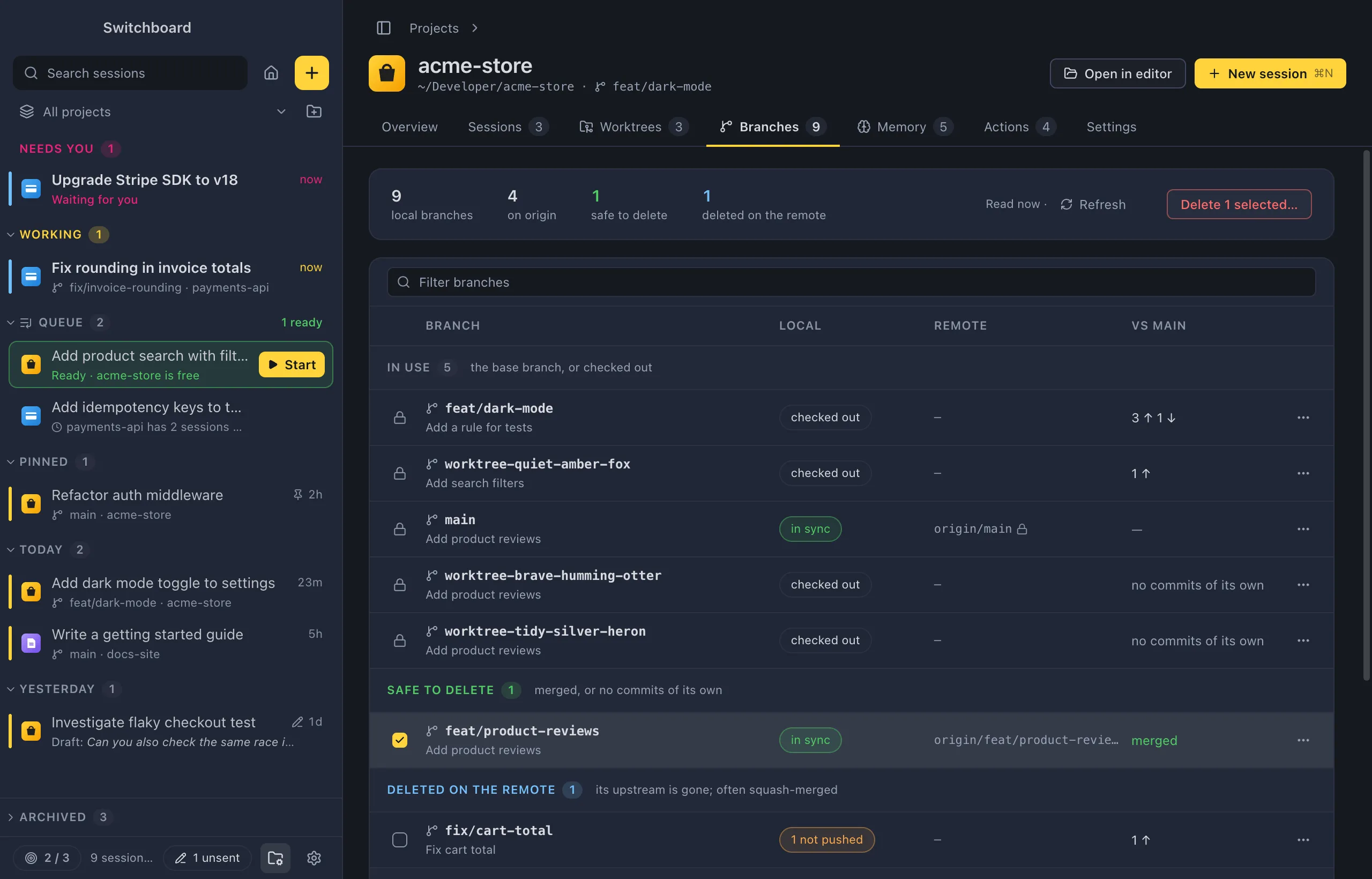
The Branches tab of a project’s page has one row per branch, here and on the remote. It says which ones are merged or deleted on the remote, and deletes the ones you pick: the local copy, the one on the remote, or both.
Open it
Section titled “Open it”- Click Branches on a project’s page, or the Branches or Git card on its Overview.
- Choose Branches… in a project’s menu in the sidebar.
- In the command palette (Command, KControl, K), run Branches in <project> for the project you are in, or Branches… and pick a project.
What the tab shows
Section titled “What the tab shows”A strip at the top counts the local branches, the branches on the remote, how many are safe to delete and how many were deleted on the remote. It also says when the list was read.
The table has these columns:
| Column | What it says |
|---|---|
| Branch | The branch’s name and its last commit’s subject. |
| Local | Its copy here: in sync, commits that aren’t pushed, checked out (and where), or upstream gone when it was deleted on the remote. |
| Remote | Its copy on the remote. |
| vs <base> | How far it is ahead of and behind the base branch. |
| Pull request | Its pull request, when the GitHub CLI (gh) is installed and signed in. |
| Last commit | When it last got a commit. |
Branches that are only on the remote have a row too. In a narrow window, the Pull request and Last commit columns are left out.
Type in Filter branches to narrow the list by name, remote, last commit or author. It says how many of the branches match.
The groups
Section titled “The groups”| Group | Which branches |
|---|---|
| In use | The base branch, and branches checked out in the project or one of its worktrees. |
| Safe to delete | Merged into the base branch (or its pull request was merged), or no commits of its own, with nothing that isn’t pushed. |
| Deleted on the remote | Its upstream is gone, which often means it was squash-merged. |
| Inactive | No commits for 90 days. |
| Active | Everything else. |
Delete branches
Section titled “Delete branches”- Pick the branches to delete. Safe local branches start picked. Click a row’s checkbox, Shift, clickShift, click a checkbox to pick a range, or press Space on a focused row. Select all in a group’s header picks every row in it.
- Click Delete N selected….
- Choose which copies go, then click Delete N.
The confirmation lists every branch and what happens to it, and has three choices:
- Delete the local branches (on). Uses
git branch -D. - Also delete them on <remote> (off). Uses
git push <remote> --delete. Deleting there removes them for everyone who uses the remote, and can’t be undone from Switchboard. - Keep a recovery ref for each local branch. Before a branch is deleted, Switchboard saves where it pointed under
refs/switchboard/removed/<branch>-<date>, so you can bring it back with git.
A branch that would lose commits gets a warning, with Keep this branch to leave it out. That happens when a local branch has commits that aren’t pushed anywhere, or when a branch on the remote has commits that aren’t in the base branch.
Cancel has the focus. When it is done, a toast says what was deleted. Branches that couldn’t be deleted are listed at the top of the tab with the reason.
Rows that can’t be picked show a lock instead of a checkbox; hover it to see why.
The row menu
Section titled “The row menu”Right-click a row, or click its ⋯, for:
- Copy branch name;
- Open pull request #N, when it has one;
- Delete local branch…;
- Delete <remote>/<branch>…, for the copy on the remote;
- Delete both…, when it is in both places.
When an item is greyed out, the reason is at the bottom of the menu.
Refresh
Section titled “Refresh”Refresh fetches from every remote first, dropping branches that were deleted there, then reads the branches again.
What is never deleted
Section titled “What is never deleted”Switchboard never deletes:
- the base branch, here or on any remote;
- the remote’s default branch;
- a branch that is checked out, in the project or in one of its worktrees;
- a branch on the remote with an open pull request, since deleting it would close the pull request.
Settings
Section titled “Settings”There are no settings for this tab. To switch the branch a session works on, see Git.