
Memory
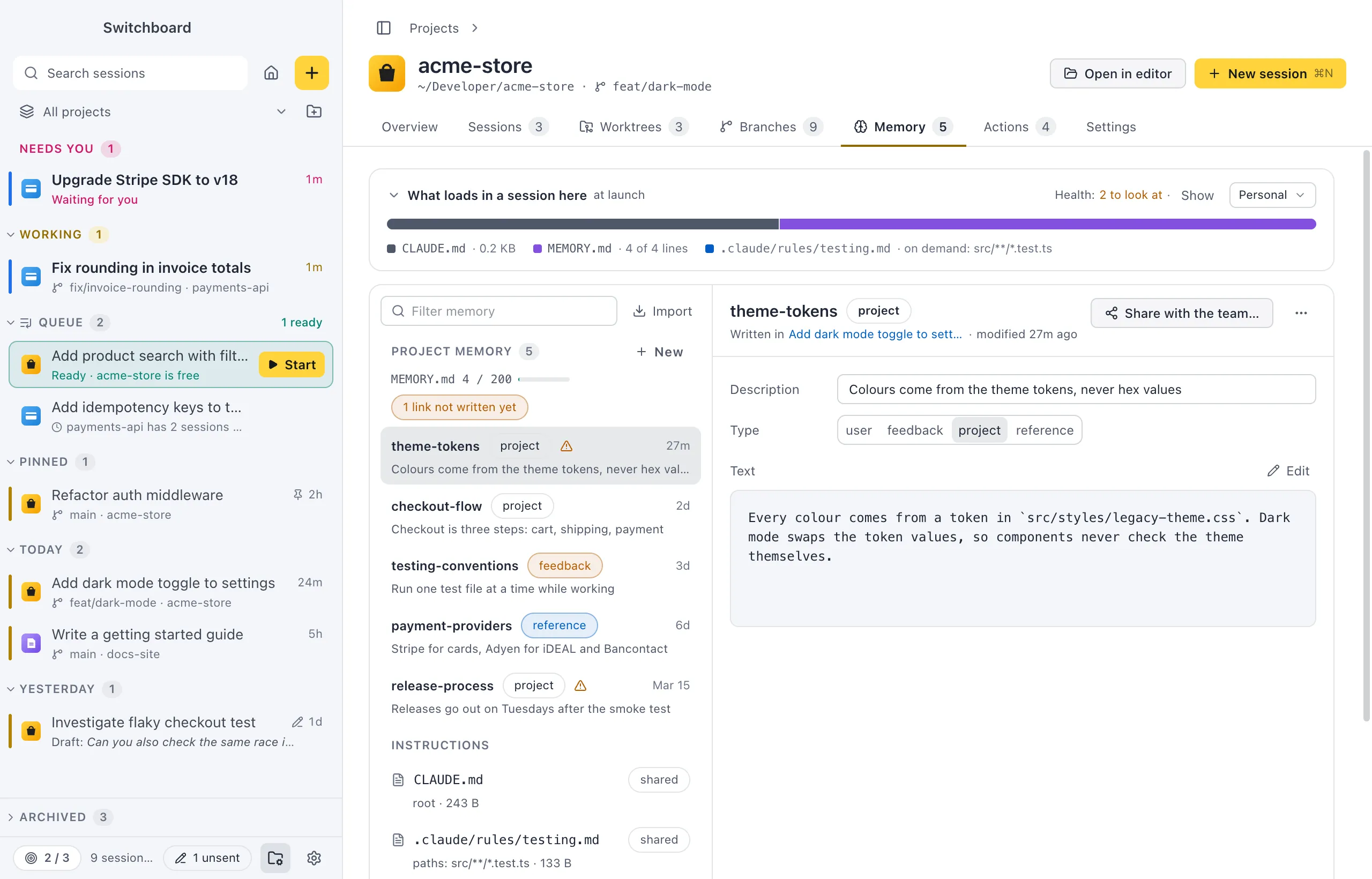
The Memory tab of a project’s page shows what Claude Code remembers about the project, the instructions the team shares, and your personal memory. Everything on it is a plain Markdown file in the folders Claude Code already reads. See Claude Code memory for how memory works.

Open it
Section titled “Open it”- Click Memory in the tab row of a project’s page. The tab shows how many memories the project has.
- Click the Memory card on the project’s Overview tab.
- Run Memory… in the command palette (Command, KControl, K). It opens the Memory tab of the current project; with no project in view, it opens Settings › Memory.
- Click a project under Projects in Settings › Memory.
How to use it
Section titled “How to use it”At the top is What loads in a session here: every file Claude Code reads when a session starts in this project, in order and by size. See What loads in a session. Its header also says how many health findings there are, with Show to list them.
Below it, the left column has a Filter memory field and three lists. Click a row to open it on the right. Import next to the field brings memories in from the Claude app, or copies them there: see Memory from the Claude app.
| List | What it holds |
|---|---|
| Project memory | The project’s memories, each with its type and age. The header has a MEMORY.md meter (how many of the 200 lines that load are used) and New. |
| Instructions | CLAUDE.md (at the root, in .claude/ and in subfolders), the rules in .claude/rules/, your CLAUDE.local.md files and subagent memory in .claude/agent-memory/. Each is marked shared (committed with the project) or local only. |
| Personal (all projects) | Memory about you, from your personal memory folder. It loads in every project. |
A small warning sign on a memory’s row means health found something to look at; hover it to see what. A chip such as “2 links not written yet” shows only the memories with links to memories that don’t exist yet.
Claude profiles
Section titled “Claude profiles”Each Claude profile keeps its own memory for a project. When the project has memory under more than one profile, a Claude profile control appears above the list (All, or one profile), and each row shows its profile’s dot. Right-click a memory and choose Copy to <profile> to copy it to another profile.
Worktrees
Section titled “Worktrees”Claude Code keeps one memory folder per repository. All of a project’s worktrees share it, so a session in a worktree reads and writes the same memory as one in the main checkout.
What you can do here
Section titled “What you can do here”- Read and edit a memory, or write a new one with New.
- Follow links between memories.
- Share a memory with the team, or copy a section of an instruction file to your memory.
- Edit instruction files such as
CLAUDE.md. - Act on health findings.
Settings
Section titled “Settings”Your personal memory folder, and the line that makes Claude Code load it, are in Settings › Memory. The tab has no settings of its own.