
Worktrees
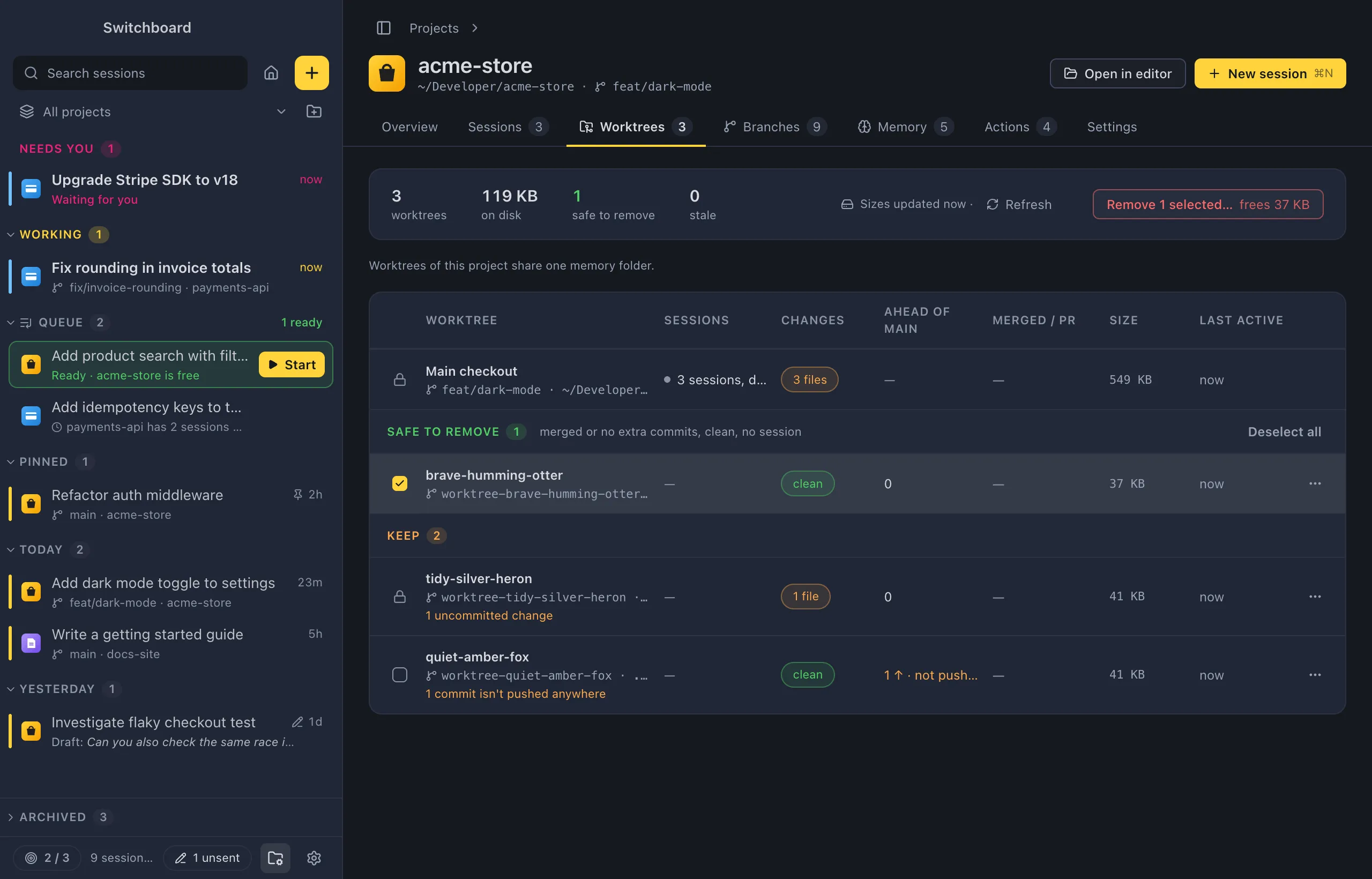
Sessions you start in a new worktree each get a full checkout under .claude/worktrees/, often with its own node_modules, and they pile up. The Worktrees tab of a project’s page lists every worktree of the repository, not only the ones Switchboard made, says which ones can go, and removes the ones you pick.
Open it
Section titled “Open it”- Click Worktrees on a project’s page.
- Click the worktree pill (“6 worktrees · 2 can go”) on a project in the Projects view.
- Choose Worktrees… in a project’s menu in the sidebar.
- In the command palette (Command, KControl, K), run Worktrees in <project> for the project you are in, or Worktrees… and pick a project.
- Run Clean up worktrees in <project>… to go straight to the confirmation for what is suggested. If nothing can go, a toast says so.
A project that isn’t a git repository has no worktrees, and the tab says so.
What the tab shows
Section titled “What the tab shows”A strip at the top sums up the project: how many worktrees it has besides the main checkout, their size on disk, how many are safe to remove and how many are stale. Sizes are measured in the background; the strip says when they were last measured.
The table has one row per worktree, with its branch and folder, and these columns:
| Column | What it says |
|---|---|
| Worktree | The worktree’s name, branch and folder. The main checkout is always the first row. |
| Sessions | Its sessions: working, needing you, or done or idle. |
| Changes | Uncommitted changes. |
| Ahead of <base> | Commits that aren’t in the base branch, and whether they are pushed. |
| Merged / PR | Whether it is merged, or the state of its pull request. |
| Size | Its size on disk. |
| Last active | When something last happened there. |
Pull requests show when the GitHub CLI (gh) is installed and signed in. In a narrow window, the Ahead and Last active columns are left out.
The groups
Section titled “The groups”The worktrees are grouped so the decision is quick:
| Group | Which worktrees |
|---|---|
| Safe to remove | Merged, or no commits of its own; no uncommitted changes; no session working there. |
| Probably done | Pushed or with an open pull request, no uncommitted changes, and nothing happened there for 14 days. |
| Keep | Everything else, with the reason: a session is working there, uncommitted changes, locked by git, commits that aren’t pushed anywhere, outside .claude/worktrees, active in the last 14 days, or not merged. |
| Stale | The folder is gone, but git still lists it. |
Only worktrees Claude Code made (under .claude/worktrees) are suggested. Others are listed under Keep and are only removed when you pick them yourself.
Remove worktrees
Section titled “Remove worktrees”- Pick the worktrees to remove. Safe to remove and Stale worktrees start picked. Click a row’s checkbox to pick or unpick it, Shift, clickShift, click a checkbox to pick a range, or press Space on a focused row. Select all in a group’s header picks every row in it.
- Click Remove N selected…. The button says how much space the selection frees.
- Check the confirmation, then click Remove N.
Rows that can’t be picked show a lock instead of a checkbox. Hover it to see why: the main checkout, a worktree locked by git, a session working there, or uncommitted changes.
The confirmation
Section titled “The confirmation”Remove N worktrees? lists every worktree that goes, with its branch, where it stands and its size, and how much space removing them frees. It also lists ignored files that would be lost with the folder, such as a local .env or editor settings. Files that come back with an install or a build, such as node_modules and build output, are left out of that list.
Two choices at the bottom:
- Also delete their branches. It is on by default only when every branch is merged, and the label says how many aren’t.
- Keep a recovery ref for each branch. Before a branch is deleted, Switchboard saves where it pointed under
refs/switchboard/removed/<branch>-<date>, so you can bring it back with git.
When a branch that would be deleted has commits that aren’t pushed anywhere, a warning says how many would be lost, with two ways out:
- Push branch pushes it first.
- Remove worktree, keep branch removes the folder but keeps that one branch.
Cancel has the focus, so Escape or ReturnEnter backs out. When the removal is done, a toast says how many worktrees went and how much space was freed. Worktrees that couldn’t be removed are listed at the top of the tab with the reason.
Prune stale entries
Section titled “Prune stale entries”The Stale group has a Prune button. It clears git’s entries for worktrees whose folder is already gone (git worktree prune), after the same confirmation.
The row menu
Section titled “The row menu”Right-click a row, or click its ⋯, for:
- Open its session: the newest session in that worktree.
- New session in this worktree: opens New session in that folder.
- Open in editor, Reveal in FinderFile Explorer and Copy path.
- Merge into <base>…: merges the branch into the base branch in the main checkout, in a terminal tab of its session, so you can see the result. The worktree stays; remove it afterwards. It needs a session in the worktree, no uncommitted changes and commits to merge.
- Push branch: pushes the worktree’s branch.
- Remove worktree…: opens the confirmation for that one worktree.
The main checkout only has the first group of items. When an item is greyed out, the reason is at the bottom of the menu.
Refresh
Section titled “Refresh”Refresh in the summary strip fetches from the remote first, so merged and pushed are up to date, then reads every worktree and measures them again.
Safety
Section titled “Safety”Switchboard only ever removes a worktree with git worktree remove, or git worktree prune when its folder is already gone. It never deletes the folder itself. It won’t remove:
- the main checkout;
- a worktree with uncommitted changes (commit or revert them first);
- a worktree locked with
git worktree lock; - a worktree where a session is working, or where a Claude Code session is open in another app or a terminal.
A session that is idle in Switchboard is stopped first; its conversation stays. Each worktree is checked again just before it is removed, and one that fails doesn’t stop the rest. A branch is deleted last, only once its worktree is gone.
Settings
Section titled “Settings”There are no settings for this tab. To finish the worktree of the session you are in, use the git menu.